| Productos->Software ->Web HMI | |
¿Qué es Web HMI? | |
¿Qué es Web HMI?
| |
WebHMI es un software gratuito que viene con alcunos controladores PAC (Programmable Automation Controller). WebHMI ofrece monitorear y controlar los controladores locales y remotos por medio de Internet Explorer corriendo en tu PC | |
Software | |
Para correr Web HMI en la PC: No hay cargo extra por el software para correr el Web HMI si tu PC tiene Microsoft Internet Explorer instalado (ver. 6 o superior). Para editar la página Web HMI: Las páginas Web HMI son archivos HTML estándar que puede ser creado por "Microsoft FrontPages" or "Macromedia Dreamweaver" u otros editores de páginas web. | |
¿Qué puede hacer el Web HMI?
| |
Monitorear y controlar en la red local Muchas aplicaciones de automatización necesitan la HMI para ver el proceso de automatización o para introducir el parámetro de proceso a los controladores. Web HMI es una opción buena y gratis para hacer éste trabajo en tu red local. | |
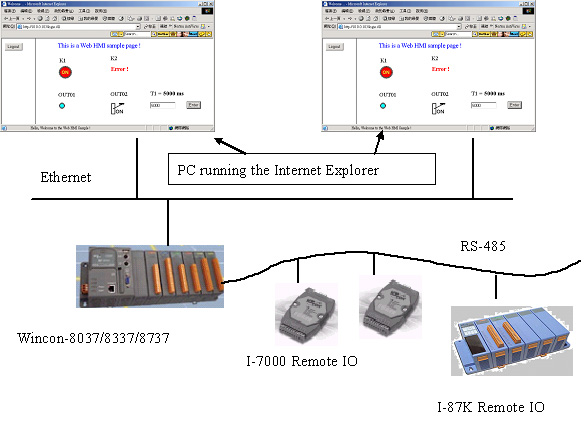 | |
Monitorear y controlar en Internet
| |
Imagina que estás muy lejos de tu campo de aplicación y aún así puedes monitorear tu aplicación y dar instrucciones al controlador en Internet. Web HMI tiene una protección de contraseña embedida de 3 niveles para prevenir ataques de hackers.
Click aquí para ver la figura2. | |
Página de Prioridad y multi-página
| |
Web HMI soporta las multi-páginas. Soporta hasta 100 páginas HTML dependiendo cuál modelo de controlador se esté usando. Cada página tiene una configuración de prioridad, puede ser baja, media o alta. Sólo el usuario del nivel alto puede accesar a páginas con prioridades altas.
Click aquí para ver la figura3. | |
Descargar archivos de datos
| |
Algunas aplicaciones pueden registrar datos de hustorial o datos analógicos u otros. La Web HMI puede ser usado para descargar estos archivos de datos desde el controlador a tu PC por medio de la red local o Internet.
Click aquí para ir a figura4. | |
Protección de contraseña de tres niveles
| |
El usuario puede habilitar o deshabilitar la protección por contraseña. Si está habilitada, hay tres niveles de contraseñas, bajo, medio o alto. Sólo el usuario con el nombre de usuario y contraseña correcta puede accesar al Web HMI.
Click aquí para ir a figura5. | |
Formato de Datos Web HMI
| |
Los datos en el controlador pueden ser abierto para Web HMI para leer y escribir. Los siguientes formatos de datos están disponibles: Boleano: Prendido / Apagado Palabra: -32768 a +32767 Largo: -2,147,483,648 ~ + 2,147,483,647 Flotante: 32 bits flotante, por ejemplo, 1.23, 2.56E-12 Cadena: por ejemplo, �Hola� , �Alarma!� Curva de Tendencia El Web HMI puede ser usado para mostrar una curva de tendencias. Click aquí para ver figura6. | |
¿Qué controlador soporta Web HMI? | |
Los controladores actualmente disponibles son:
W-8031 / 8331 / 8731 : Controlador Wincon Estándar W-8037 / 8337 / 8737 : Controlador Wincon ISaGRAF |


Comprar ahora

Buscar productos